Chủ Nhật, 29 tháng 11, 2015

DISABLE YOUR SYSTEM CACHE


To prepare your Magento for production, you need to first disable system cache by going to the Administration Panel (http://yourhost.com/admin) and navigating to System à Cache Management. Select the check boxes next to Layouts, Blocks HTML output and Translations and then under Actions select
Disable and click Submit. Each of those Cache Types should have a red bar in the status area that reads ”DISABLED.” This helps to ensure that you see a faithful reflection of your store front as you make the changes.

Note: Depending on what you are attempting to achieve, you may need to disable additional cache files in this area or even manually delete cache files in your folder structure. Do not manually delete folders unless you know what you are doing.

BLOCKS in Magento Design

 
Blocks are a way by which Magento distinguishes the array of functionalities in the system and creates a modular way to manage it from both visual and functional standpoint. There are two types of blocks and they work together to create the visual output.

Structural BlocksThese are blocks created for the sole purpose of assigning visual structure to a store page such as header, left column, main column and footer.

Content BlocksThese are blocks that produce the actual content inside each structural block. They are representations of each features functionality  in a page and employ template files to generate xHTML to be inserted into its parent structural block. Category list, mini cart, product tags and product listing, etc, are
each its own content block. Instead of including template after template as a typical eCommerce application
would in order to gather the entire xHTML output, Magento gathers and arranges page content through blocks.


LayoutsThese are the files that essentially map your content blocks to your structural blocks. Layouts in Magento have two functionsthey define both the structural and content blocks and then they inform Magento how and where to connect them up.

Thứ Hai, 23 tháng 11, 2015

Images tab in Magento

1.       On the Product InformaIon page, select the Images tab.

2.       Click on Browse Files....  In the dialog box that appears, select one file to upload.

3.       Select an image to upload, and then click on the Open or OK buton in the dialog box.

4.       If you want the same image to be used for base, small, and thumbnail, you can move to the next step. If you want to use separate images for each of the three images, then click on Browse Files... and select more images.

5.       AGer you select all the images that you want for this Product, click on Upload Files.
The files will be uploaded to the Images page.

6.       Select the image you want for the base, small, and thumbnail images by clicking the radio butons.

7.       To exclude an image type, click on the radio buton in the top row for No Image. This means that wherever Magento would have used that image size, Magento will not display an image.

8.       Enter a Label for each image. This will be used as the "alt text" for that image.

9.       Click on Save And ConInue Edit.


10.   The Design tab is next on the menu. We will skip that tab because it is beyond the scope of this beginner's guide. Instead, proceed to the Inventory tab.

Thứ Năm, 19 tháng 11, 2015

Treo chân mày giá bao nhiêu tốt ?

Câu hỏi: Chào bác sĩ đôi chân mày của em hiện nay gặp phải tình trạng ngấn mỡ, đè nặng lên mí mắt khiến chúng bị trĩu xuống. Sau khi tham khảo thông tin dịch vụ nâng mí mắt, thì e quyết định thực hiện vậy cho em hỏi nâng chân mày giá bao nhiêu ạ ? (Linh Đan, Nhật Lệ , Tp Huế)
nang-chan-may-gia-bao-nhieu
Trả lời:
Xin chào bạn Linh Đan !
Bộ phận tư vấn xin cảm ơn bạn đã gởi câu hỏi đến chuyên mục tư vấn thẩm mỹ và chúng tôi xin giải đáp thắc mắc của bạn như sau.
“Mắt phượng mày ngày” luôn là một trong những tiêu chuẩn đánh giá vẻ đẹp của người phụ nữ Việt từ xa xưa đến nay. Tuy nhiên theo thời gian  lớp da quanh mi mắt xuất hiện nhiều lớp mỡ thừa, lão hoá khiến chân mày bị kéo xuống che phủ mí gây ra tình trạng sụt mí.
Để lấy lại nét thanh xuân cho chị em hiện nay phẫu thuật nâng chân màyđang được yêu chuộng bởi là phương pháp hiện đại với nhiều công nghệ hiện đại được sử dụng như nâng chân mày bằng bằng edotine, phẫu thuật căng da trán, nâng bằng chỉ …
nang-chan-may-gia-bao-nhieu
Đến với thẩm mỹ viện Trương Kiều Xuân khách hàng được bác sĩ thăm khám tư vấn, kiểm tra cận kẽ từ đó đưa ra các phương pháp treo chân mày phù hợp cho cơ địa của từng người sao cho hiệu quả được tối ưu nhất.
Nâng chân mày giá bao nhiêu
Đừng lo lắng, chúng tôi biết bạn đang phân vân về điều này. Phẫu thuật nâng chân mày chỉ là một tiểu phẫu nhỏ, chỉ thực hiện vài vết rạch kín dưới mí mắt và được thực hiện bằng phương pháp nội soi nên hoàn toàn không đau, không để lại sẹo, rất an toàn và chi phí thì rất là mềm cho “hầu bao” của quý khách.
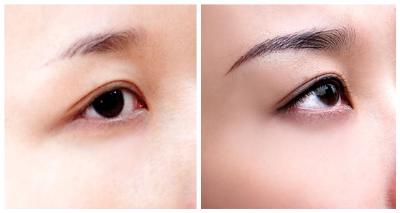
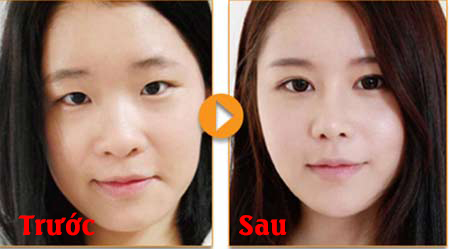
Hình ảnh khách hàng sau khi phẫu thuật
ket-qua-nang-chan-may-gia-bao-nhieu
Đến đây chắc bạn đang rất nóng lòng muốn tìm hiểu về ưu điểm, các công nghệ nâng chân mày đẹp nào là phù hợp cho bạn rồi phải không nào. Còn chần chờ gì nữa mà không nhắc máy gọi ngay cho bộ phận tư vấn chúng tôi.
Thẩm mỹ viện Trương Kiều Xuân đang chờ bạn và sẵn sàng giúp bạn sỡ hữu một đôi chân mày đẹp tự nhiên, quyến rũ và không kém phần kiêu sa.